'/%3e%3cdefs%3e%3clinearGradient%20id='paint0_linear_6609_68599'%20x1='3.18225'%20y1='15.6908'%20x2='32.433'%20y2='20.6207'%20gradientUnits='userSpaceOnUse'%3e%3cstop%20stop-color='%230048ED'/%3e%3cstop%20offset='1'%20stop-color='%230DECD7'/%3e%3c/linearGradient%3e%3c/defs%3e%3c/svg%3e)
'/%3e%3cdefs%3e%3clinearGradient%20id='paint0_linear_6609_68609'%20x1='3.18219'%20y1='15.6908'%20x2='32.4329'%20y2='20.6207'%20gradientUnits='userSpaceOnUse'%3e%3cstop%20stop-color='%236896FF'/%3e%3cstop%20offset='1'%20stop-color='%230DECD7'/%3e%3c/linearGradient%3e%3c/defs%3e%3c/svg%3e)


Meta Muse vs ChatGPT Work vs Claude Cowork: Which One Actually Gets Work Done?
Meta Muse, ChatGPT Work, and Claude Cowork can all move beyond ordinary chat. Each can work through multiple steps, use external context, and produce something useful. The meaningful difference is not whether they are “agents.” It is what kind of work each product is organized around.
- Meta Muse is centered on personal goals and actions across everyday services.
- ChatGPT Work is a broad work environment built around projects, connected apps, and finished materials.
- Claude Cowork emphasizes delegated knowledge work in selected files, desktop tools, and browser workflows.
If your main question is which one fits a professional workflow, compare the starting context, review process, and what happens after the first result—not only the model behind it.
At a glance
| Dimension | Meta Muse | ChatGPT Work | Claude Cowork |
|---|---|---|---|
| Primary framing | Personal AI agent | Agent for longer work and finished deliverables | Agentic mode for multi-step knowledge work |
| Natural starting point | A personal task or goal | A task inside ChatGPT, often with project or connected-app context | A goal plus selected folders, tools, or browser context |
| Typical strengths | Everyday actions, monitoring, connected services, background goals | Research, analysis, broad project context, documents, sheets, slides, reports, Sites | Local-file and desktop workflows, research synthesis, file organization, document production |
| Browser and tools | Dedicated cloud environment and connected services | Connected apps plus browser and desktop capabilities where supported | Browser, desktop tools, and authorized folders where supported |
| Review and control | Permission requests vary by action, connector, and settings | Permissions and takeover depend on the app, task, plan, and surface | Shows task steps; access is limited to selected folders and enabled tools |
| Best fit | Personal delegation across daily services | Broad professional work inside the ChatGPT environment | Hands-on knowledge work grounded in desktop files and tools |
Meta Muse: strongest when the task starts in everyday life
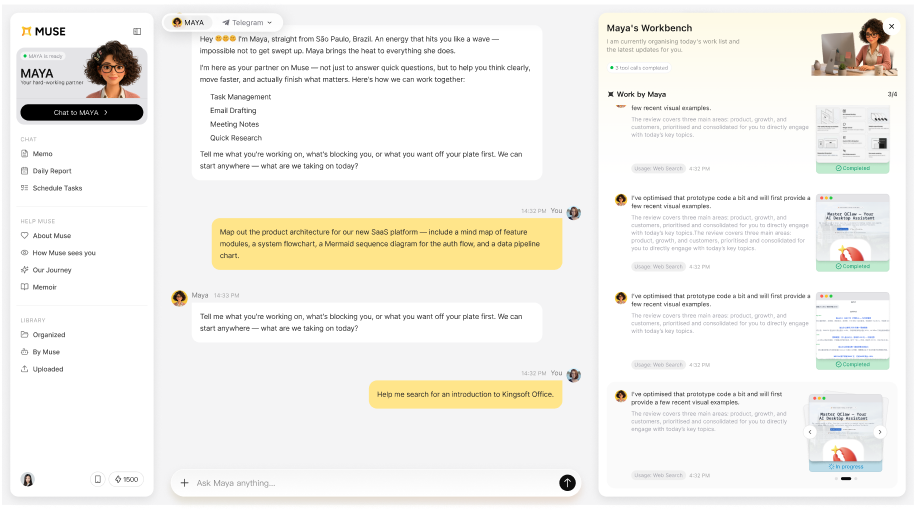
Meta introduced Muse as a personal AI agent that can take actions, use a browser, connect to services, and keep goals moving. Official Help Center pages also say it can create and edit documents, spreadsheets, PDFs, images, code, and web apps.
That means Meta Muse is not limited to reminders and bookings. It can overlap with professional work. Its clearest fit, however, remains a task that begins with personal context and crosses everyday services: organize email, monitor a price, plan travel, schedule something, fill a form, or follow an ongoing goal.
Choose Meta Muse when:
- personal accounts and daily services hold the relevant context;
- the desired result includes actions, monitoring, or reminders;
- you want a conversational personal agent and it is available in your region;
- its permission model matches the access you are comfortable granting.
ChatGPT Work: strongest as a broad project environment
OpenAI describes ChatGPT Work as an agent for longer, more involved tasks. It can research and analyze information, work across supported apps and files, and create finished documents, spreadsheets, presentations, reports, and Sites. Work can use context from existing ChatGPT Projects, and supported desktop flows may access local files and apps with permission.
Its strongest appeal is breadth. A user or team already working in ChatGPT can bring together project instructions, conversations, files, connected apps, and different output formats without moving to a separate product category.
Choose ChatGPT Work when:
- your team already organizes context in ChatGPT;
- you need a general environment spanning research, analysis, creation, and connected apps;
- shared projects and broad tool coverage matter;
- your plan and workspace settings support the workflow you need.
Claude Cowork: strongest for delegated desktop knowledge work
Anthropic positions Cowork around complete, multi-step tasks for non-technical knowledge workers. You give it a goal, point it at selected folders and tools, and receive work for review. Anthropic highlights local-file access, browser tasks, research synthesis, file organization, spreadsheets, and formatted presentations.
Its file controls are concrete: official desktop documentation says reads and writes are limited to folders the user connects. That makes Cowork especially easy to understand when the work is already sitting on a computer in a defined project folder.
Choose Claude Cowork when:
- the job begins with local files and desktop applications;
- you want the agent to show its steps and work within selected folders;
- the task is research, analysis, document creation, or file organization;
- you are comfortable with the plan and usage requirements for agentic work.
How files, context, and approvals differ
| Question | Meta Muse | ChatGPT Work | Claude Cowork |
|---|---|---|---|
| Where can context come from? | Uploaded artifacts, web browsing, and supported connectors | Chats, Projects, uploaded files, supported connected apps, and desktop context where available | Selected folders, connected tools, browser context, and supported cloud sources |
| What can it produce? | Documents, spreadsheets, PDFs, images, code, web apps, and actions in supported services | Documents, spreadsheets, presentations, reports, Sites, and supported app actions | Documents, spreadsheets, presentations, organized files, research outputs, and supported tool actions |
| How can work continue? | Background goals, reminders, scheduled tasks, and ongoing personal context | Projects, saved sources, reusable templates, and scheduled or event-triggered tasks where supported | Scheduled tasks, cross-device continuation, folders, connectors, and recurring workflows |
| What can the user review? | Task details, approval prompts, Activity log, Upcoming tasks, artifacts | Progress, questions, proposed changes, important-action approvals, files and final materials | Plan, visible steps, files and tools used, folder permissions, and completed output |
| What varies? | Region, account, platform, connectors, actions, and permission settings | Plan, platform, workspace settings, administrator controls, apps and actions | Plan, organization settings, platform, connectors, folder mode and cloud/local execution |
The same label—“spreadsheet,” “scheduled task,” or “connected app”—can describe very different workflows. What matters is where the data lives, how access is granted, what can be reviewed, and how corrections carry forward.
The same assignment, three different starting points
Consider this request:
Prepare a quarterly product review from performance spreadsheets, customer notes, roadmap changes, and the last leadership meeting. Show what changed, why it matters, and the decisions needed next.
With Meta Muse, the fit depends on whether those sources are available through its current artifacts, browser, and connected services, and whether you want the task managed inside a personal-agent relationship.
With ChatGPT Work, you might begin inside a Project containing the source files and instructions, then ask Work to research, analyze, and create the final materials.
With Claude Cowork, you might authorize a project folder and relevant tools, then let Cowork synthesize the files and produce the deliverable for review.
For a meaningful comparison, give each product the same sources, instructions, deadline, and definition of done, then compare the review-ready result.
Walking the quarterly review through each product
With Meta Muse
You would define the review goal, provide or upload the relevant artifacts, and connect any supported services that hold useful context. Muse can research, work with documents and spreadsheets, and create artifacts. Before using it for a real review, check whether the needed work accounts and sources are available, set approval preferences, and inspect the Activity log as the task progresses.
With ChatGPT Work
You might begin in a Project that already contains the previous review, reporting definitions, uploaded files, and standing instructions. Work can gather information from supported apps, analyze the spreadsheets, and create the report or presentation. Reusable templates can help keep recurring business reviews consistent. Plan, app, and administrator settings determine which actions are available.
With Claude Cowork
You might select the local folder containing exports, the current deck, and supporting notes, then authorize the browser or connected tools needed for research. Cowork shows its steps and can produce a document, spreadsheet, or presentation for review. Folder mode matters: read-only may suit analysis, while editing the actual workbook or deck requires a write-enabled scope.
These setup differences determine where the work begins, what access must be granted, and what the reviewer can inspect before approving the final deck.
When the work needs to continue: MuseWork
MuseWork is a separate AI work product built around a different starting point: professional tasks that must move from scattered context to a reviewable result and then continue.
The product is designed around a continuous work relationship:
- understand the goal, material, and boundaries;
- work through the research, analysis, organization, and production;
- return a result the user can inspect and revise;
- preserve the project context and working standards that should matter next time;
- help continue the next step instead of treating the delivered file as the end.
MuseWork brings completion, in-context collaboration, and continued work with the same Assistant into one workflow, so the project can move forward without restarting from a blank conversation.
Try the comparison with your own work
“Use these project files to prepare a quarterly review. Cite the evidence behind each conclusion, flag missing information, build the presentation, and list the follow-up actions that need my approval.”
Create my quarterly review
What that quarterly review could look like in MuseWork
- Deep Research: verify market and competitor changes, preserve citations, and separate confirmed evidence from assumptions.
- Spreadsheet work: combine performance data, calculate changes, compare segments, and flag anomalies or missing inputs.
- Slides: turn the findings into an editable leadership deck with a clear decision narrative.
- Visuals: create supporting diagrams, concept images, or campaign directions that match the same audience and brief.
- Follow-up: carry review comments into the revised deck and turn approved decisions into owners and next actions.
Explore the connected workflow through MuseWork Deep Research, MuseWork Slides, Research to Presentation, and MuseWork Image Generator.
Which one should you choose?
Choose Meta Muse if…
Your priority is personal delegation across everyday services, and the task includes actions, monitoring, reminders, or personal goals.
Choose ChatGPT Work if…
You want a broad professional environment connected to ChatGPT Projects, apps, research, analysis, and multiple finished formats.
Choose Claude Cowork if…
Your work is grounded in selected local folders and desktop tools, and you want to delegate a complete knowledge-work task for review.
Choose MuseWork if…
You want the same work partner to understand your professional context, produce a reviewable result, absorb your feedback, and continue the work that follows.
Start with the result you need
Instead of asking which agent is smartest, define the work: inputs, audience, required evidence, deliverable, review points, and next action. Then test the tools that fit those conditions.
Related reading
Sources
- Meta, Muse, Introducing Muse, and official Muse Help Center documentation.
- OpenAI, ChatGPT Work, ChatGPT Work and Codex, and official file-creation documentation.
- Anthropic, Claude Cowork, Claude for work, and Claude Desktop documentation.
- MuseWork, Home and Desktop.
FAQ
Is Meta Muse better than ChatGPT Work?
The better fit depends on where the task starts and what you need at the end. Meta Muse is designed around personal delegation and connected everyday services. ChatGPT Work emphasizes longer professional work, connected context, and finished deliverables.
Is Claude Cowork only for coding?
No. Anthropic positions Cowork for non-coding knowledge work such as research, analysis, document creation, file organization, spreadsheets, and presentations. Claude Code remains the coding-focused product.
Can all three create files?
Official documentation indicates that all three can create or work with multiple kinds of files or deliverables. Exact formats and editing workflows vary by product, plan, and surface.
Which is best for recurring professional work?
Check how each product handles project context, scheduled or background work, connected sources, review, and reuse of instructions. The best choice depends on where your work lives and how much context should carry forward.
Which product is easier to audit while it works?
Meta Muse offers task details, approval prompts, an Activity log, and an Upcoming view. ChatGPT Work lets users follow progress, answer questions, redirect work, and approve important actions. Claude Cowork shows the files, tools, and steps it uses and scopes local access to selected folders. The practical difference depends on the task and the controls available on your plan or workspace.
Can these products run recurring work?
All three describe forms of continued or scheduled work. Meta Muse supports ongoing goals, reminders, and scheduled tasks; ChatGPT Work supports scheduled or event-triggered tasks where available; Claude Cowork supports recurring schedules and cross-device continuation. Check whether a specific task depends on a local machine, connected app, administrator setting, or plan.
Which one should I use for spreadsheets?
Meta Muse can create and edit spreadsheet artifacts. ChatGPT Work can create or edit spreadsheet files and, where supported, native Google Sheets. Claude Cowork can work with spreadsheets in selected folders or connected tools. Compare formula transparency, source access, output format, and how corrections carry into the next version.